How Businesses Can Build an End-to-End AI Workflow
How Businesses Can Build an End-to-End AI Workflow : From AI Chatbots to Autonomous AI Agents
An end-to-end AI workflow is more than connecting a chatbot to an API. Traditional AI chatbots are primarily designed to understand a request and generate a response. Modern autonomous AI agents can go further: they can retrieve context, select tools, execute actions, evaluate results, maintain memory, and continue a workflow until a defined goal is reached.
For engineering teams, this changes the architecture. A production-grade AI system may need:
- LLM-based reasoning
- Function calling and structured tool schemas
- Retrieval-Augmented Generation (RAG)
- Multi-tier memory
- State machines or graph-based orchestration
- API integrations
- Authentication and authorization
- Idempotent tool execution
- Observability and tracing
- Evaluation pipelines
- Human-in-the-loop controls
- Circuit breakers and execution limits
The goal is not to make every business process fully controlled end-to-end by AI.
The goal is to design a controlled end-to-end AI workflow where AI is responsible for the tasks it can perform reliably, while deterministic systems and humans handle the parts that require stronger guarantees.
AI Chatbots vs Autonomous AI Agents
The most important architectural difference is not simply that an agent is "smarter." It is that an agent can participate in a stateful action loop. If you're starting with the conceptual difference between the two, see our guide on AI Chatbots vs AI Agents: What's the Difference? (2026 Guide).
| Capability | Traditional AI Chatbot | Autonomous AI Agent |
|---|---|---|
| Natural-language understanding | Yes | Yes |
| Context retention | Usually session-based | Multi-tier memory |
| Knowledge retrieval | Optional | Usually integrated |
| Tool/API calling | Limited or predefined | Dynamic tool selection |
| Multi-step planning | Limited | Supported |
| State management | Conversation state | Explicit workflow state |
| External actions | Limited | Core capability |
| Validation | Basic | Schema + business-rule validation |
| Retry handling | Usually application-level | Workflow-aware retries |
| Human escalation | Optional | Designed into workflow |
| Observability | Chat logs | Traces, tool calls, state transitions, metrics |
Chatbot
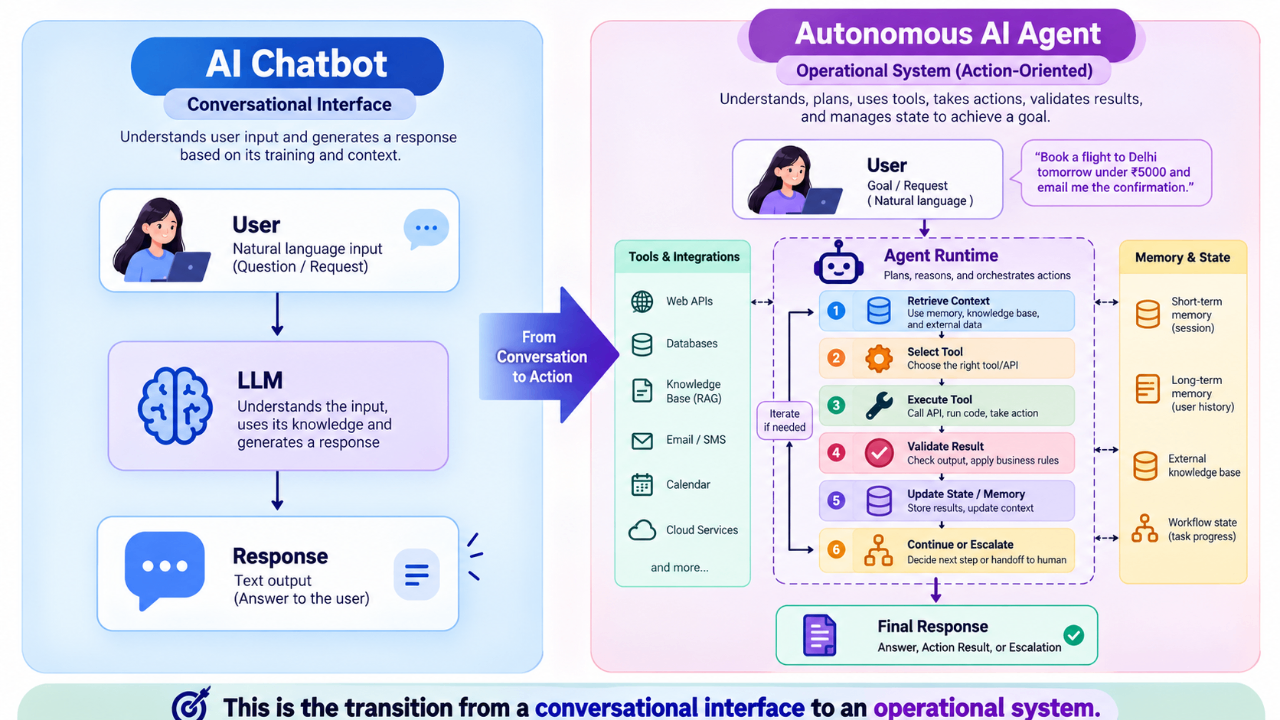
This is the transition from a conversational interface to an operational system.
What Is an End-to-End AI Workflow?
An end-to-end AI workflow connects the complete lifecycle of a business task rather than automating a single conversational step. This builds on the broader business-automation approach covered in How AI Automation Can Save Businesses 20+ Hours Every Week in 2026
For example, a B2B lead workflow might look like:
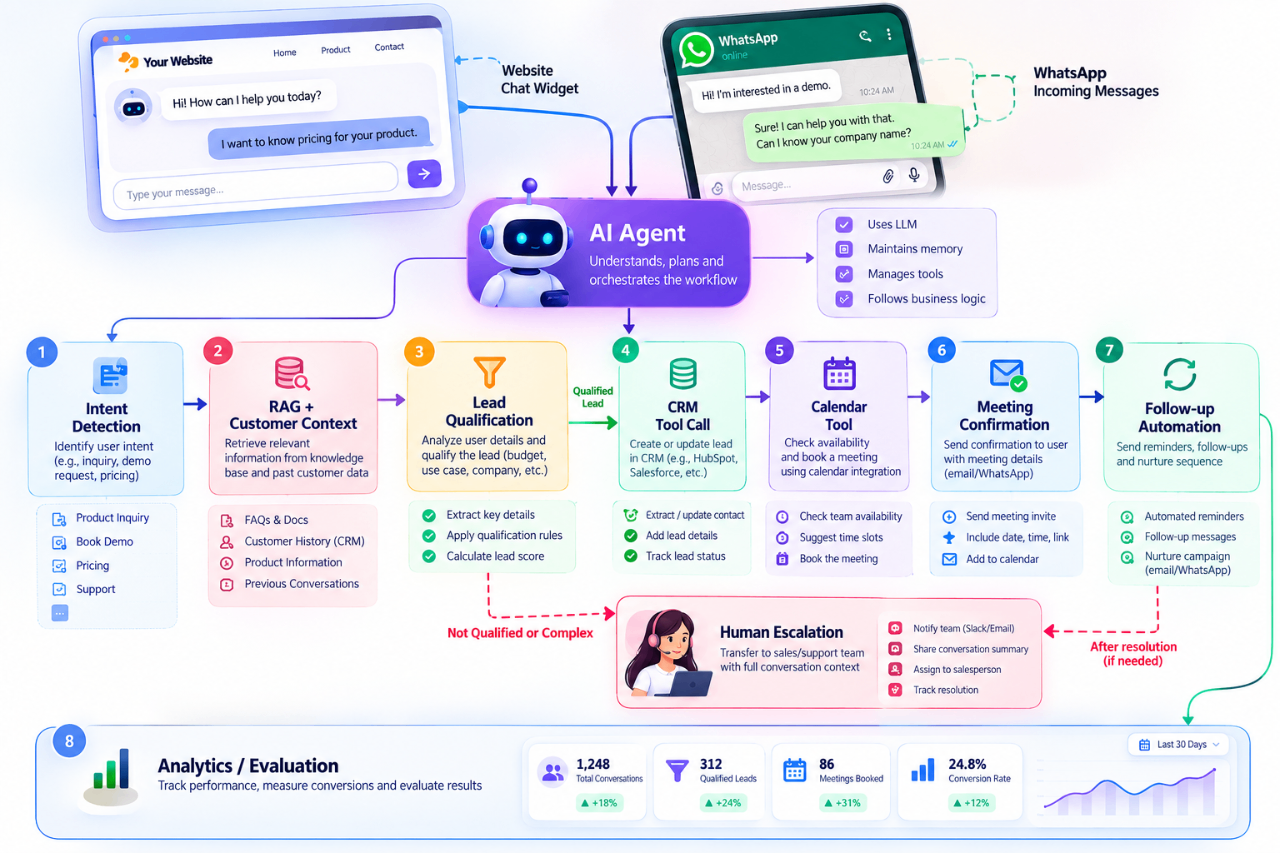
The architecture can combine probabilistic AI components with deterministic software.
That distinction is important:
Use AI for ambiguity and reasoning. Use deterministic systems for guarantees.
For example, an LLM can determine that a customer wants to schedule a meeting. The calendar service should still deterministically validate the time slot and create the event.
A Production Architecture for Autonomous AI Agents
A production AI agent should be treated as an application architecture, not simply a prompt. For a deeper foundation on planning, memory, reasoning, knowledge retrieval, tool use, and execution, see AI Agent Architecture Explained: How Modern AI Agents Actually Work
A simplified architecture can be represented as:
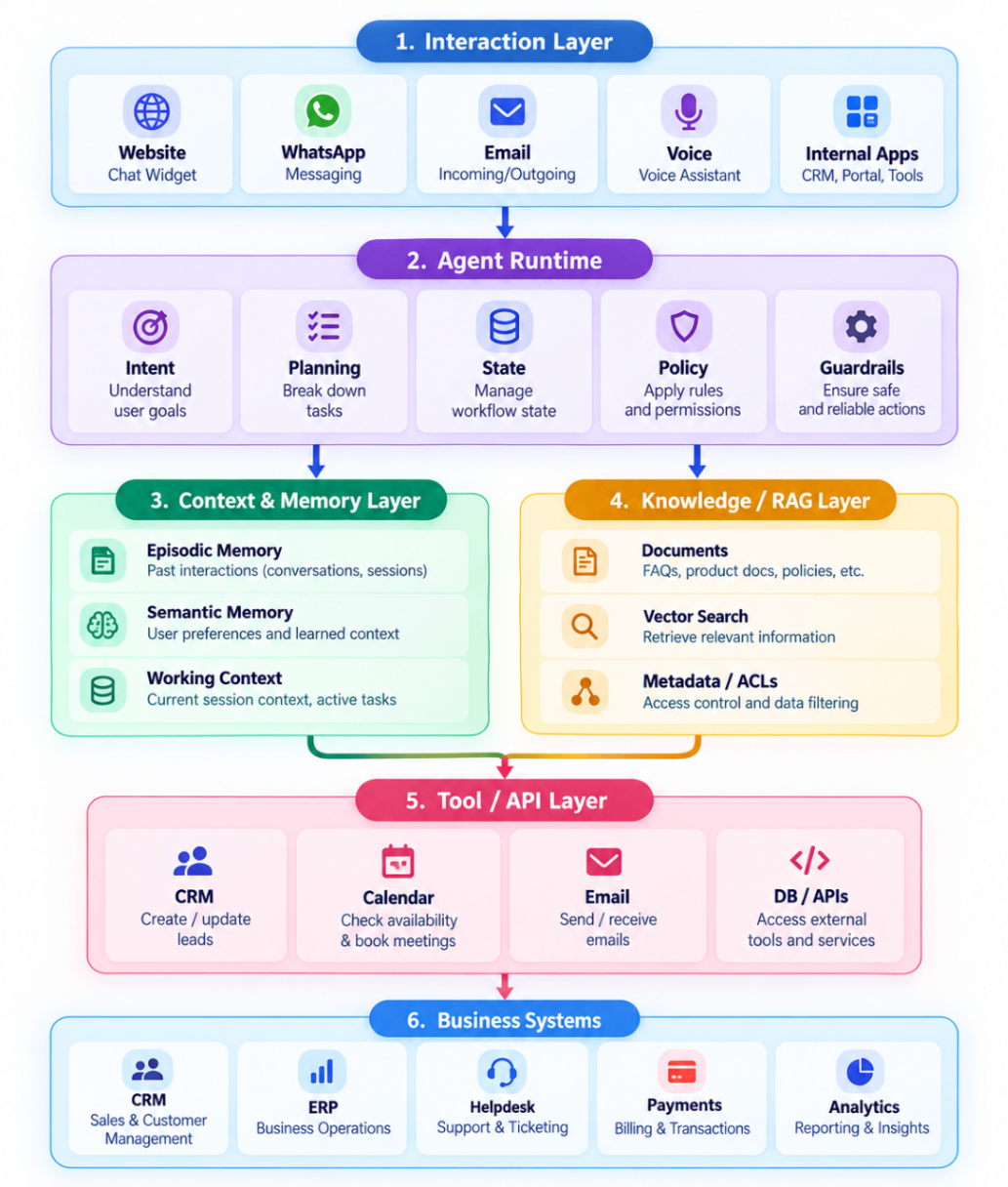
The agent runtime coordinates these layers while security and observability should cut across the entire stack.
1. Function Calling and Tool Schemas
A common mistake is to think that an AI agent should receive a prompt such as:
"When the user wants a meeting, schedule it."
In production, the model should instead be given a typed tool interface.
For example, a calendar tool can expose a JSON Schema-like contract:
{
  "name": "create_calendar_event",
  "description": "Create a calendar event after availability has been validated.",
  "input_schema": {
    "type": "object",
    "properties": {
      "title": {
        "type": "string"
      },
      "start_time": {
        "type": "string",
        "format": "date-time"
      },
      "end_time": {
        "type": "string",
        "format": "date-time"
      },
      "attendee_email": {
        "type": "string",
        "format": "email"
      }
    },
    "required": [
      "title",
      "start_time",
      "end_time",
      "attendee_email"
    ],
    "additionalProperties": false
  }}
Instead:
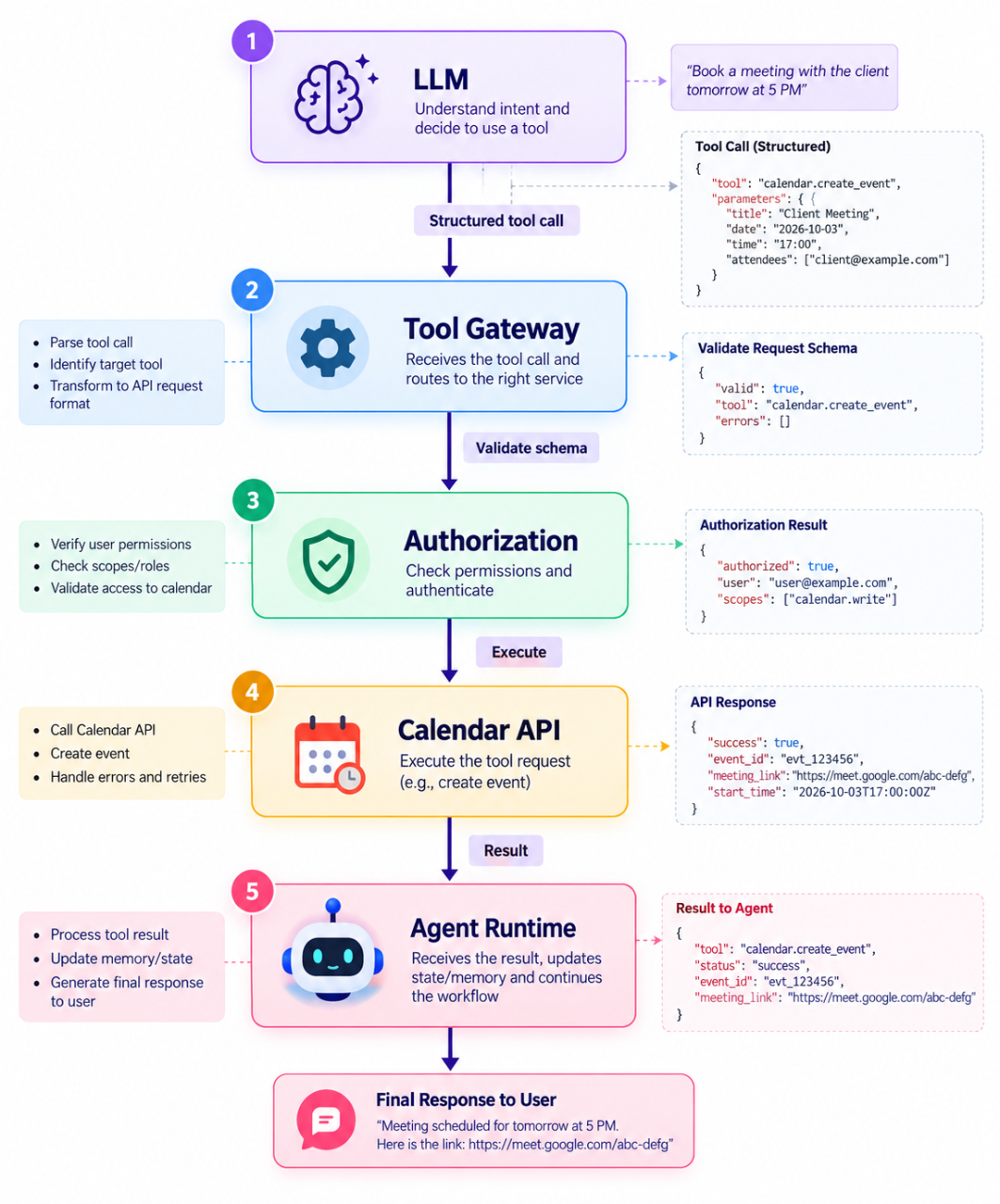
This separation provides stronger control over what an agent can do.
Why Tool Schemas Matter
They provide:
- Structured inputs
- Type validation
- Explicit contracts
- Better observability
- Safer tool execution
- Easier testing
- Clear API boundaries
The LLM decides which tool to call and with what arguments. The application remains responsible for validating and executing that request.
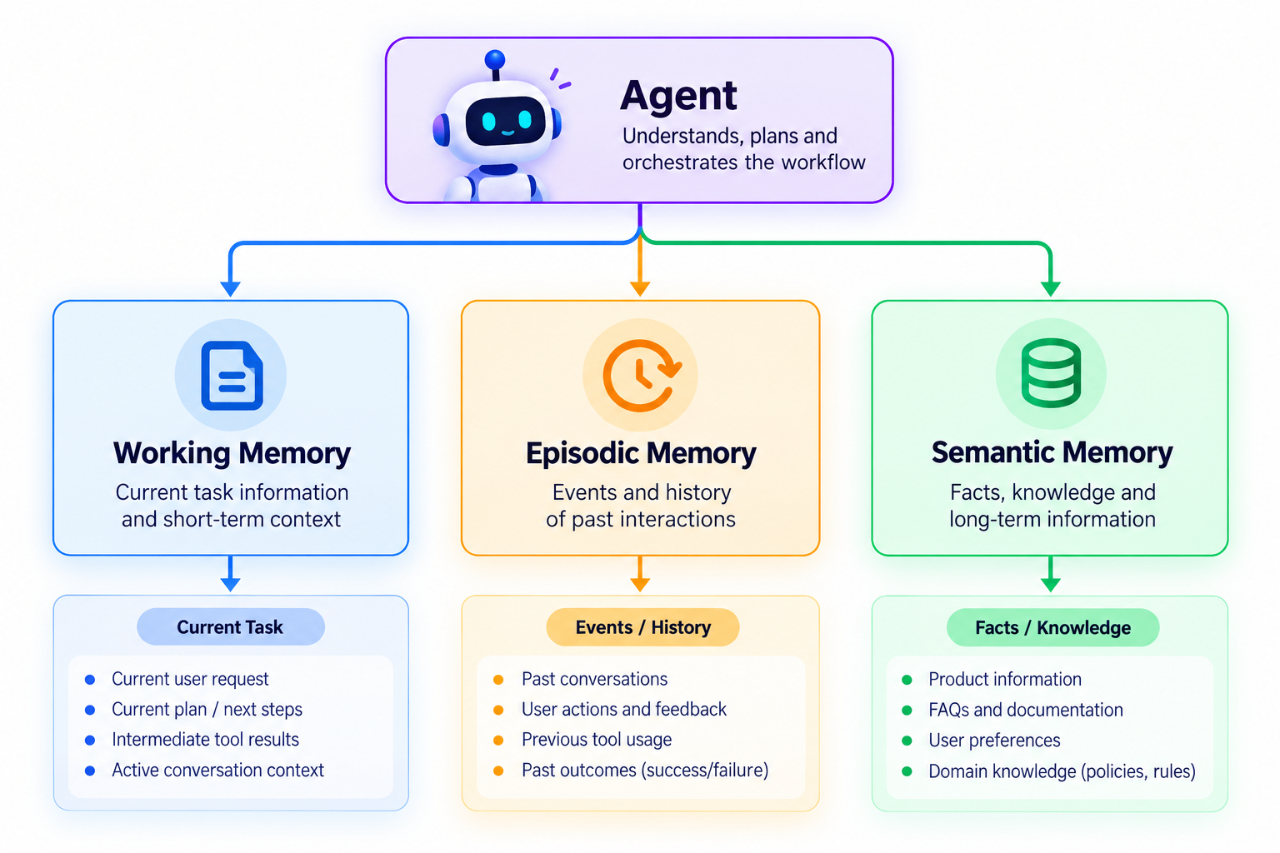
2. Multi-Tier Memory: Working, Episodic and Semantic
"Context retention" is not enough to describe memory in an autonomous agent. Samyora's AI Agent Architecture guide introduces the role of memory in agent systems; here we extend that concept into separate working, episodic, and semantic tiers.
A production system can use multiple memory tiers.
Working Memory
Short-lived information required for the current task.
Example:
- Current user request
- Current tool results
- Current plan
- Current workflow state
This generally belongs in the active execution context.
Episodic Memory
A record of previous interactions or events.
Example:
- Customer requested an enterprise demo.
- Demo was scheduled for September 30.
- Customer asked about SSO support.
This can help the agent understand what happened previously.
Semantic Memory
Long-lived facts or knowledge extracted from previous interactions.
Example:
- Customer uses Microsoft 365.
- Customer's organization has approximately 500 employees.
- Customer is evaluating enterprise SSO.
A simplified architecture:
3. RAG and Knowledge Grounding
An autonomous agent often needs information that is specific to the business.
This is where Retrieval-Augmented Generation (RAG) becomes important.
A basic RAG pipeline is:
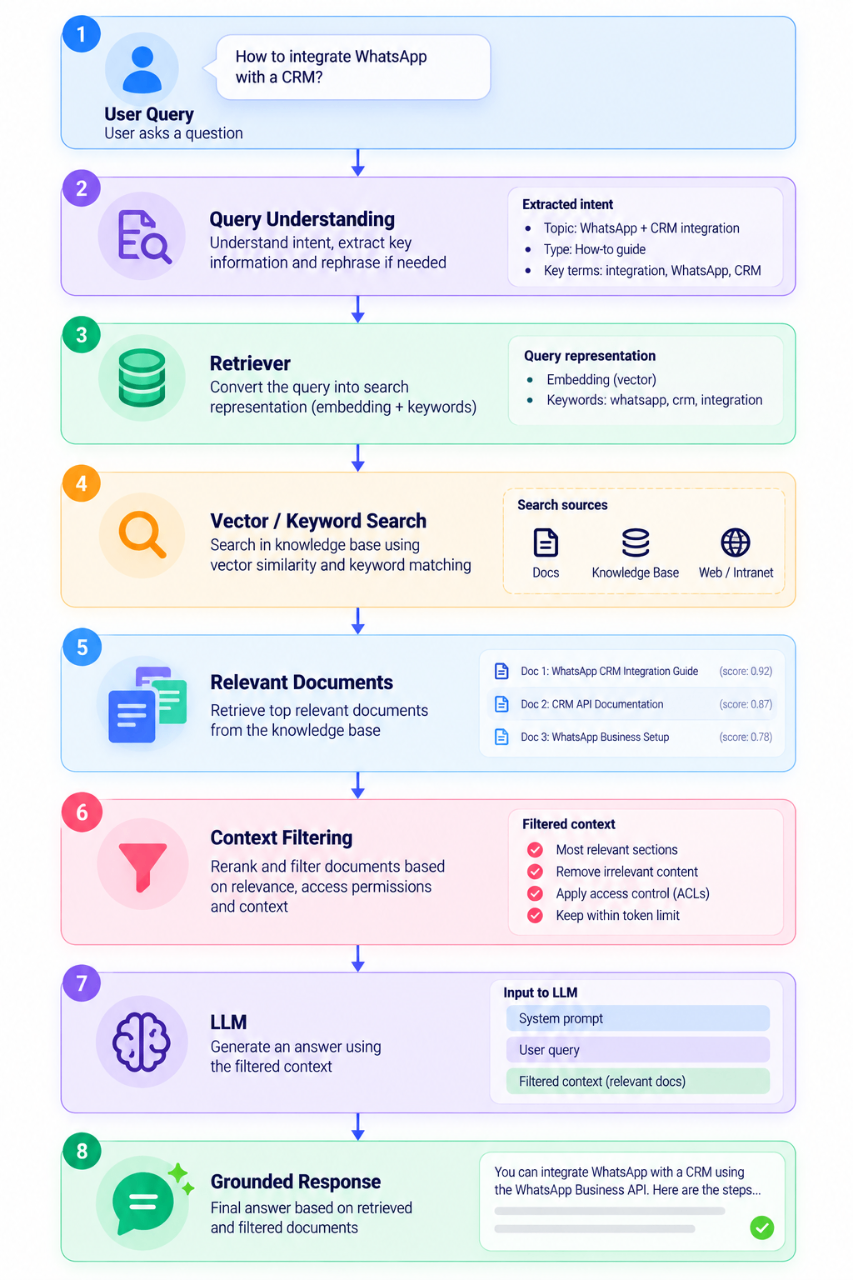
For enterprise systems, retrieval should also consider:
- Document permissions
- Tenant isolation
- Metadata filtering
- Document freshness
- Source attribution
- Chunk quality
- Retrieval latency
A technically strong RAG system is therefore more than "put documents into a vector database."
4. ReAct Loops and Agentic Execution
A simple chatbot usually follows:
Input → Prompt → Output
An agent can use an iterative reasoning-and-action pattern.
A simplified ReAct-style loop looks like:
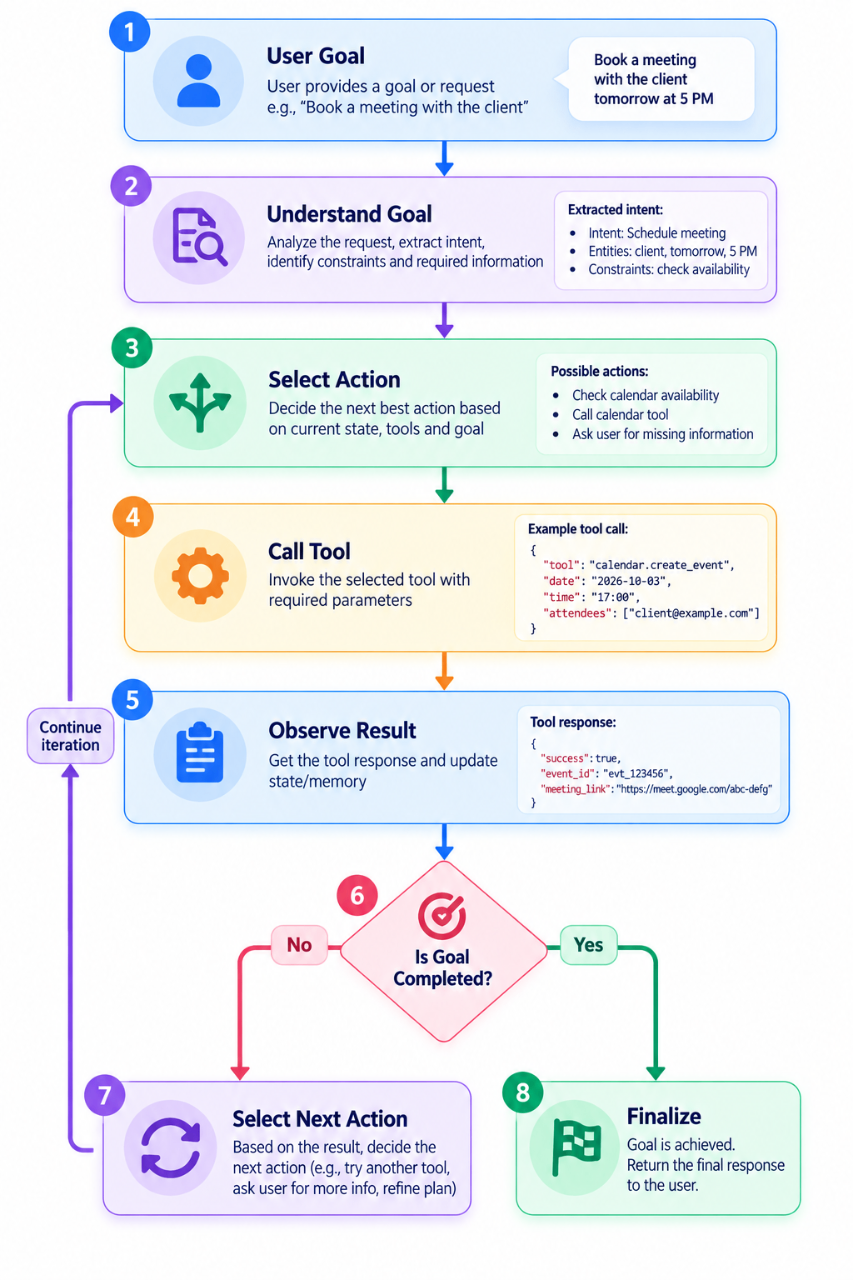
In a real implementation, the loop must have explicit limits. In a real implementation, the loop must have explicit limits.
For example:
MAX_STEPS = 8

for step in range(MAX_STEPS):
    action = agent.next_action(state)

    result = execute(action)

    state = update_state(state, result)

    if state.goal_completed:
        break
else:
    raise AgentExecutionLimit("Maximum agent steps exceeded")
The exact implementation will vary, but the principle is important:
Autonomy should always have a bounded execution budget.
5. State Machines, LangGraph and Temporal-Style Orchestration
For multi-step workflows, an unstructured agent loop can become difficult to debug.
A better approach is to represent the workflow as explicit states.
For example:
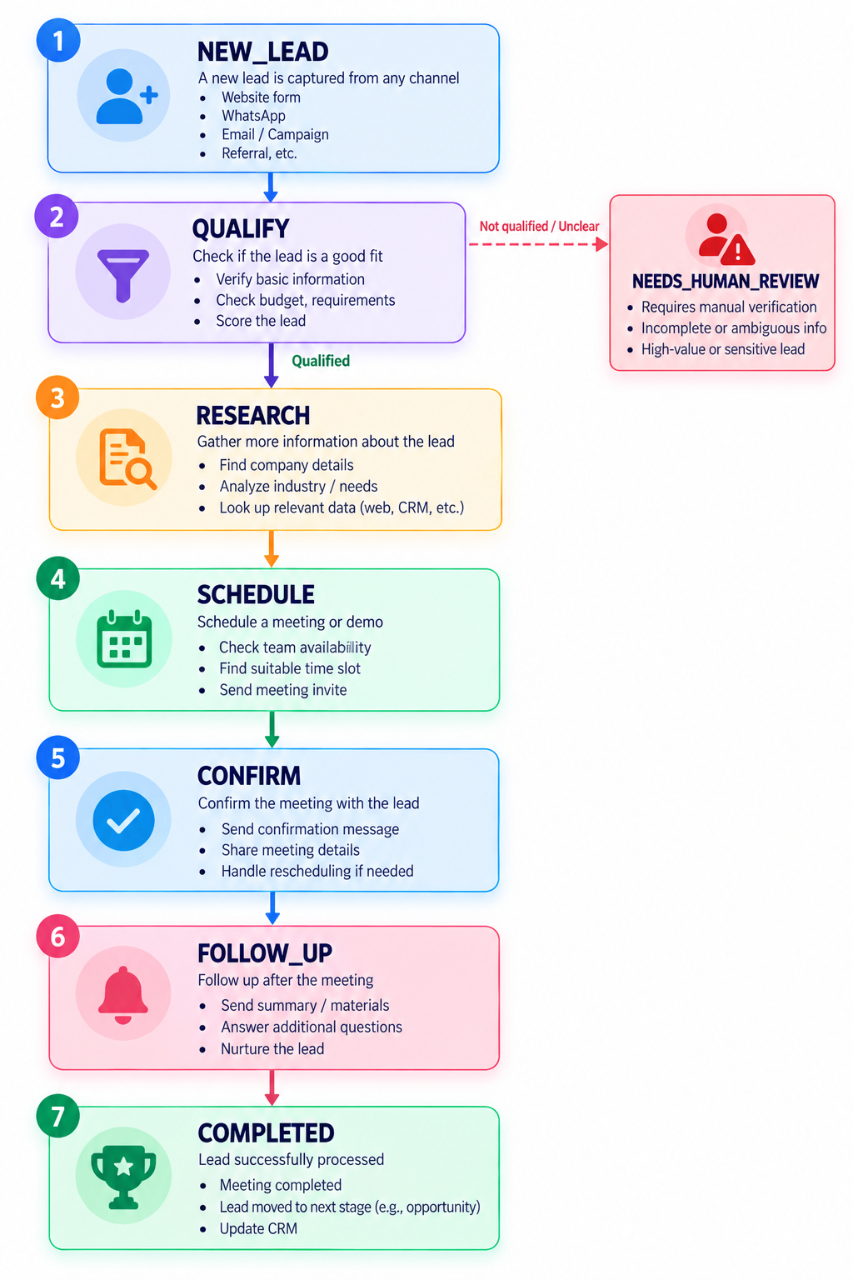
This is a state machine.
Frameworks such as LangGraph can model agent workflows as graphs where nodes represent actions and edges represent transitions. Workflow engines such as Temporal can be useful when durable execution, retries, timers, and long-running workflows are required.
The architectural distinction is:
| Approach | Best suited for |
|---|---|
| Simple loop | Short agent tasks |
| ReAct-style loop | Tool-using reasoning |
| State machine | Explicit finite workflow states |
| Graph orchestration | Branching agent workflows |
| Durable workflow engine | Long-running, retryable business processes |
| DAG planner | Dependency-driven tasks with known execution relationships |
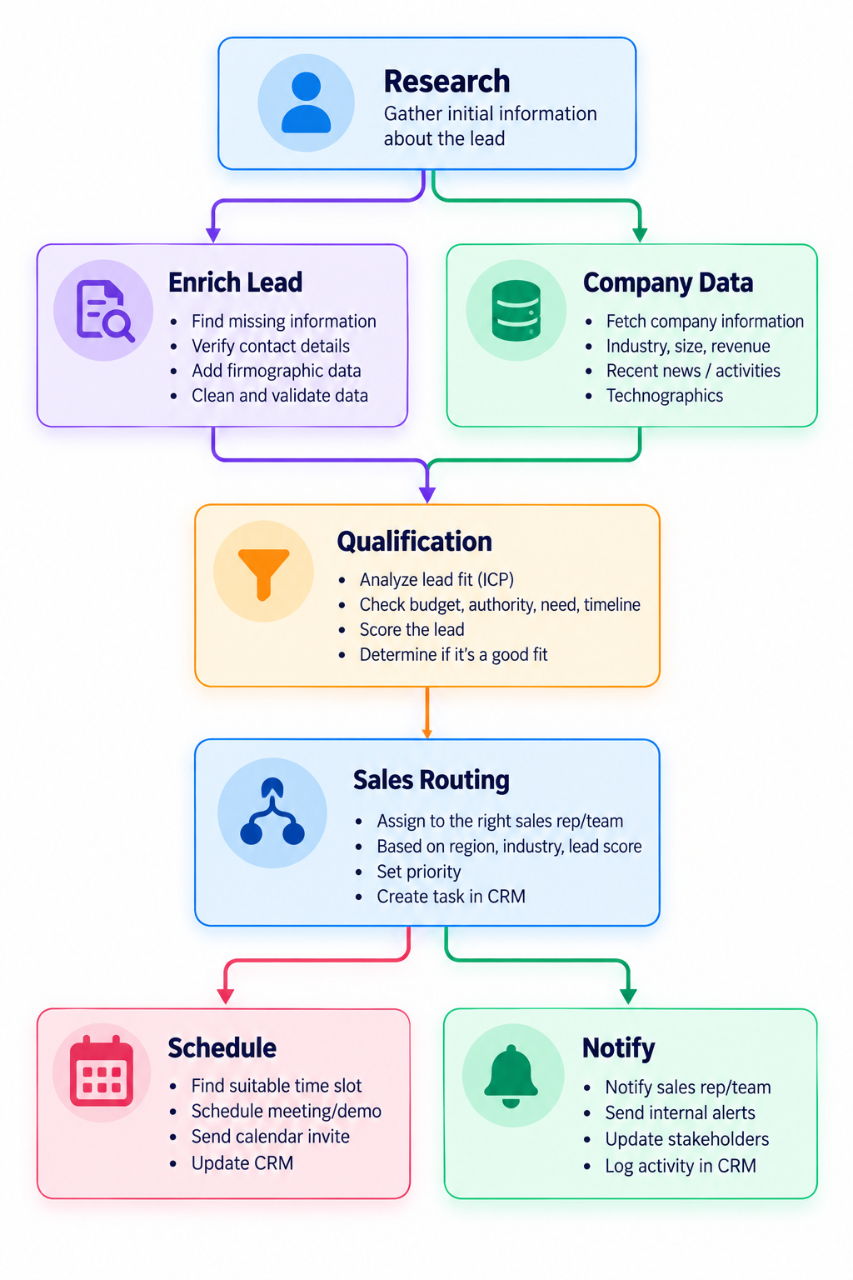
DAG Planners for Predictable Dependencies
Not every workflow requires free-form agent reasoning.
If task dependencies are known, a Directed Acyclic Graph (DAG) can provide a more deterministic execution model.
For example:
- Dependencies are known
- Tasks can run in parallel
- Execution order matters
- Reproducibility is important
- Workflow state should be explicit
A useful production principle is to combine the two approaches:
Use deterministic orchestration for known dependencies and agentic reasoning where ambiguity actually exists.
7. Tool Gateway and API Integration
Agents should not receive unrestricted access to internal systems.
A safer architecture is to place a tool gateway between the agent and business APIs.
                    AI Agent
                       |
                       v
                +--------------+
                | Tool Gateway |
                +------+-------+
                       |
       +---------------+---------------+
       v               v               v
    CRM API        Calendar API      Email API
The gateway can enforce:
- Schema validation
- Authentication
- Authorization
- Rate limits
- Audit logging
- Idempotency
- Input sanitization
- Output validation
- Tool-specific policies
This prevents the LLM from becoming a privileged application user.
Engineering Safety: Building Guardrails for Autonomous Agents
Autonomous AI agents introduce a different class of engineering risks because the system can make decisions and trigger external actions. For a broader production-safety framework covering hallucinations, prompt injection, unauthorized tool access, data leakage, least privilege, human approval, and evaluation, see Building Safe AI Agents: Best Practices for Production Deployment.
Principle of Least Privilege
An agent should receive only the permissions required for its workflow.
For example, a lead qualification agent may need:
CRM:
  READ lead
  CREATE lead
  UPDATE qualification_status
It may not need:
DELETE customer
EXPORT database
MODIFY billing
CHANGE permissions
A useful rule is:
Do not give an agent database-wide access when a narrowly scoped tool can perform the required operation.
Idempotency Keys
Retries are normal in distributed systems.
Suppose an agent calls:
create_calendar_event()
The network times out after the calendar service creates the event.
The agent retries.
Without idempotency, two invitations could be created.
A safer design is:
Agent
  |
  | request_id = "lead_123_demo_456"
  v
Tool Gateway
  |
  v
Calendar Service
The service stores the idempotency key and prevents the same operation from being executed twice.
This is especially important for:
- Payments
- Orders
- Calendar events
- Emails
- Database writes
- Ticket creation
Circuit Breakers and Execution Limits
Agentic systems can accidentally enter loops.
For example:
Search → Tool → Search → Tool → Search → Tool → ...
Without controls, this can increase latency and token costs.
Production systems should define limits such as:
Maximum agent steps:       8
Maximum tool calls:        12
Maximum execution time:    30 seconds
Maximum token budget:       defined per workflow
Maximum retry count:        3
A circuit breaker should stop execution when the system exceeds defined thresholds.
The agent should then either:
- Return a controlled failure
- Retry through a bounded policy
- Escalate to a human
- Queue the task for later processing
Human-in-the-Loop Architecture
Autonomous does not mean unsupervised.
Some operations should require human approval.
A practical pattern is:
Agent
  |
  v
Risk / Policy Check
  |
  +---- Low Risk ----> Execute
  |
  +---- Medium Risk -> Validate
  |
  +---- High Risk ---> Human Approval
                           |
                           v
                        Execute
```md
Examples of high-risk operations may include:

*   Large financial transactions
*   Sensitive account changes
*   Destructive database operations
*   Security-sensitive actions
*   High-value customer commitments
*   Legal or compliance decisions

The AI should be able to recognize when it has reached the boundary of its authority.

## Observability: Trace the Entire Agent Workflow

Traditional application logs are not enough for complex AI systems.

Engineering teams should be able to answer:

*   What did the user ask?
*   What context did the agent retrieve?
*   Which tools did it select?
*   What arguments did it send?
*   Which state transitions occurred?
*   How many retries happened?
*   Why did the workflow stop?
*   Was a human involved?

A useful trace can look like:

```text
Trace ID: wf_92831

10:00:01  User Request
10:00:01  Intent Detection
10:00:02  RAG Retrieval
10:00:02  Tool Selection: search_crm
10:00:03  Tool Result
10:00:03  State Transition: QUALIFY → SCHEDULE
10:00:04  Tool Selection: check_calendar
10:00:04  Tool Result
10:00:05  Human Approval
10:00:07  Tool Selection: create_event
10:00:08  Workflow Completed
This makes debugging and incident analysis substantially easier.
Measuring an AI Workflow With Production KPIs
AI quality should be measured at both the model level and the workflow level.
Reliability and Schema Metrics
Schema Validation Rate
Percentage of model-generated tool calls that pass schema validation.
Schema Validation Rate =
Valid Tool Calls / Total Tool Calls × 100
A production target can be defined according to the workflow's risk tolerance; for tightly constrained tools, teams may target >99%.
Tool Success Rate
Successful Tool Calls / Total Tool Calls × 100
This identifies integration failures separately from model failures.
RAG Groundedness
Measure how often responses are supported by retrieved sources.
Teams can track:
- Groundedness score
- Citation coverage
- Retrieval precision
- Retrieval recall
- Unsupported-claim rate
For high-value knowledge workflows, teams may set an internal target such as <1% unsupported responses, but the exact threshold should depend on the use case and evaluation methodology.
Latency
Average latency can hide production problems.
Track:
- P50 latency
- P95 latency
- P99 latency
- Time spent in retrieval
- Time spent in model inference
- Tool execution latency
For example:
Workflow P95 = 4.8 seconds
RAG P95      = 650 ms
Tool P95     = 900 ms
LLM P95      = 2.7 seconds
This helps engineers identify the actual bottleneck.
Token Cost per Task
Instead of tracking only API spend, measure cost at the workflow level.
Token Cost per Task =
Input Tokens + Output Tokens
                ×
Model Pricing
Then compare:
Average Cost / Task
P95 Cost / Task
Cost by Workflow
Cost by Agent
Cost by Tool
This becomes especially important when autonomous loops can make multiple model calls.
Evaluation: Test the Workflow, Not Just the Prompt
A production agent should be evaluated against representative scenarios.
A test suite might contain:
Scenario 01 → Normal lead qualification
Scenario 02 → Missing customer data
Scenario 03 → Invalid email
Scenario 04 → Duplicate request
Scenario 05 → Tool timeout
Scenario 06 → Unauthorized request
Scenario 07 → Conflicting information
Scenario 08 → Human escalation
Scenario 09 → Repeated tool failure
Scenario 10 → Prompt injection attempt
Evaluation should measure:
- Task completion
- Tool selection accuracy
- Schema validity
- Policy compliance
- Groundedness
- Recovery behavior
- Escalation behavior
- Latency
- Cost
This is much more meaningful than evaluating the quality of a single chatbot response.
A Complete Example: Website Lead-to-Meeting Workflow
Consider a company that wants to automatically convert qualified website visitors into booked sales meetings. For the customer-facing side of this architecture, see Is Your Website Losing Customers? Here's How AI Can Help, which covers website AI agents, lead generation, appointment booking, CRM integration, and human handoff.
Step 1: Interaction
The visitor asks:
"We need an AI automation platform for our 100-person sales team. Can you arrange a demo?"
Step 2: Intent and Entity Extraction
The agent extracts:
{
  "intent": "book_demo",
  "company_size": 100,
  "department": "sales",
  "interest": "AI automation"
}
Step 3: Knowledge Retrieval
The agent retrieves relevant product information and verifies that the requested use case is supported.
Step 4: CRM Lookup
The agent calls:
search_crm_contact(email)
The tool gateway validates the arguments and authorization.
Step 5: Qualification
The workflow determines whether the lead meets predefined qualification criteria.
Step 6: Calendar Availability
The agent calls:
check_calendar(
    sales_rep="enterprise_sales",
    date_range="next_7_days"
)
Step 7: Human Approval
If the lead is high-value, the workflow can route the proposed meeting to a sales representative for approval.
Step 8: Idempotent Booking
Once approved:
create_calendar_event(
    idempotency_key="lead_782_demo_2026_09_30"
)
Step 9: CRM Update
The workflow records:
Lead Status: Qualified
Meeting Status: Booked
Source: Website AI Agent
Step 10: Follow-Up
The system sends the customer a confirmation and schedules a reminder.
The complete workflow becomes:
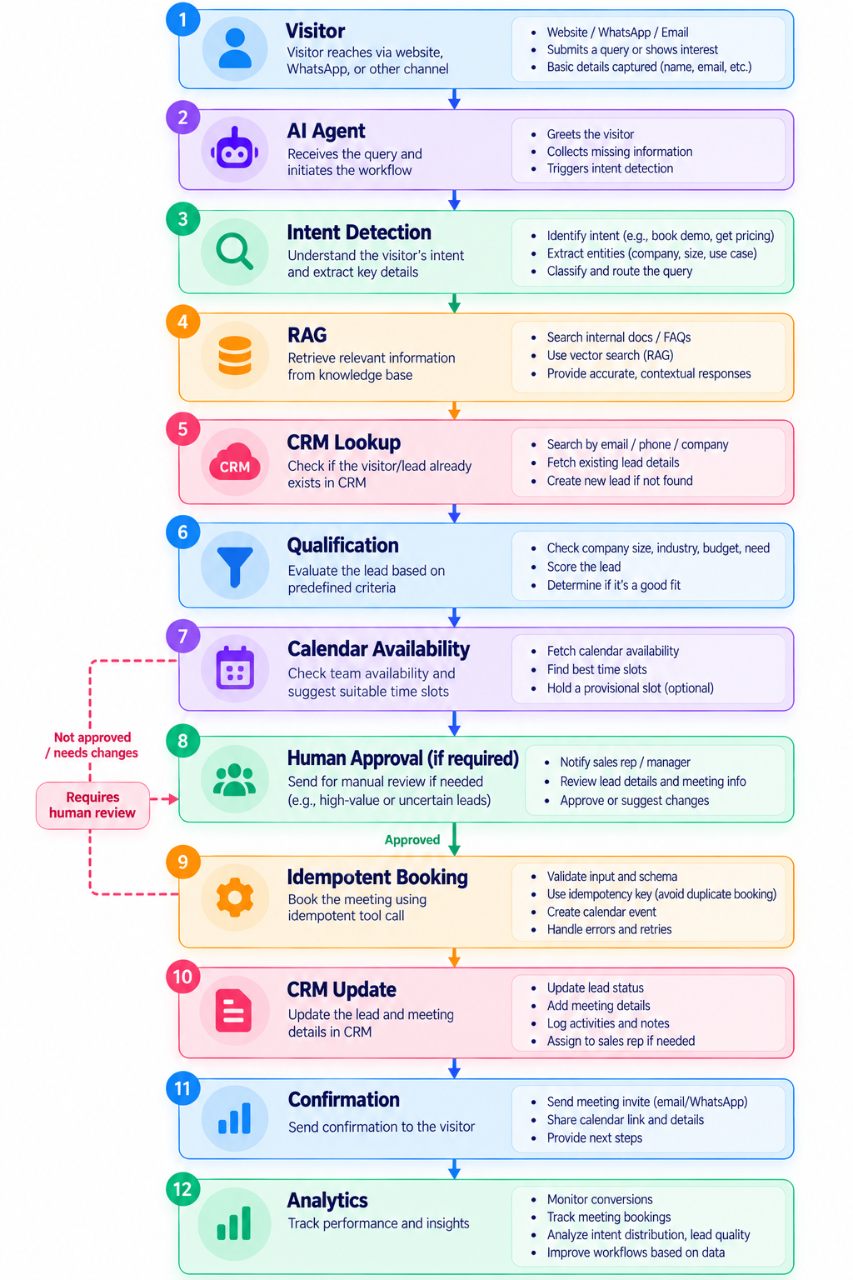
This is what an end-to-end AI workflow looks like when designed as a production system.
Where Businesses Should Start
Trying to automate the entire organization at once usually creates unnecessary complexity.
A better engineering approach is:
1. Select One Workflow
Choose a process with:
- High volume
- Repetitive manual work
- Clear inputs and outputs
- Measurable business value
- Manageable risk
2. Map the Existing Process
Document:
Input
 ↓
Decision
 ↓
Action
 ↓
System
 ↓
Output
3. Separate AI Decisions From Deterministic Operations
Use the model for:
- Intent interpretation
- Classification
- Summarization
- Planning
- Natural-language interaction
Use deterministic code for:
- Authentication
- Authorization
- Financial calculations
- Database constraints
- Idempotency
- Validation
- Transaction handling
4. Introduce Tools
Expose only the APIs the workflow actually requires.
5. Add Guardrails
Implement:
- Least privilege
- Schema validation
- Rate limits
- Execution limits
- Human escalation
- Audit logs
6. Measure Before Scaling
Track latency, cost, reliability, tool success, groundedness, and task completion.
Then expand the workflow.
From Individual AI Tools to an AI Operating Layer
Many companies use AI as a collection of disconnected tools. Samyora's 10 AI Tools Every Small Business Needs in 2026 also highlights the problem of siloed AI tools and the value of connecting them into a unified workflow.
Many companies use AI as a collection of disconnected tools:
AI Writer
AI Chatbot
AI Meeting Summarizer
AI CRM Assistant
AI Analytics Tool
The next step is to connect those capabilities.
Instead of:
Tool A + Tool B + Tool C + Tool D
businesses can build:
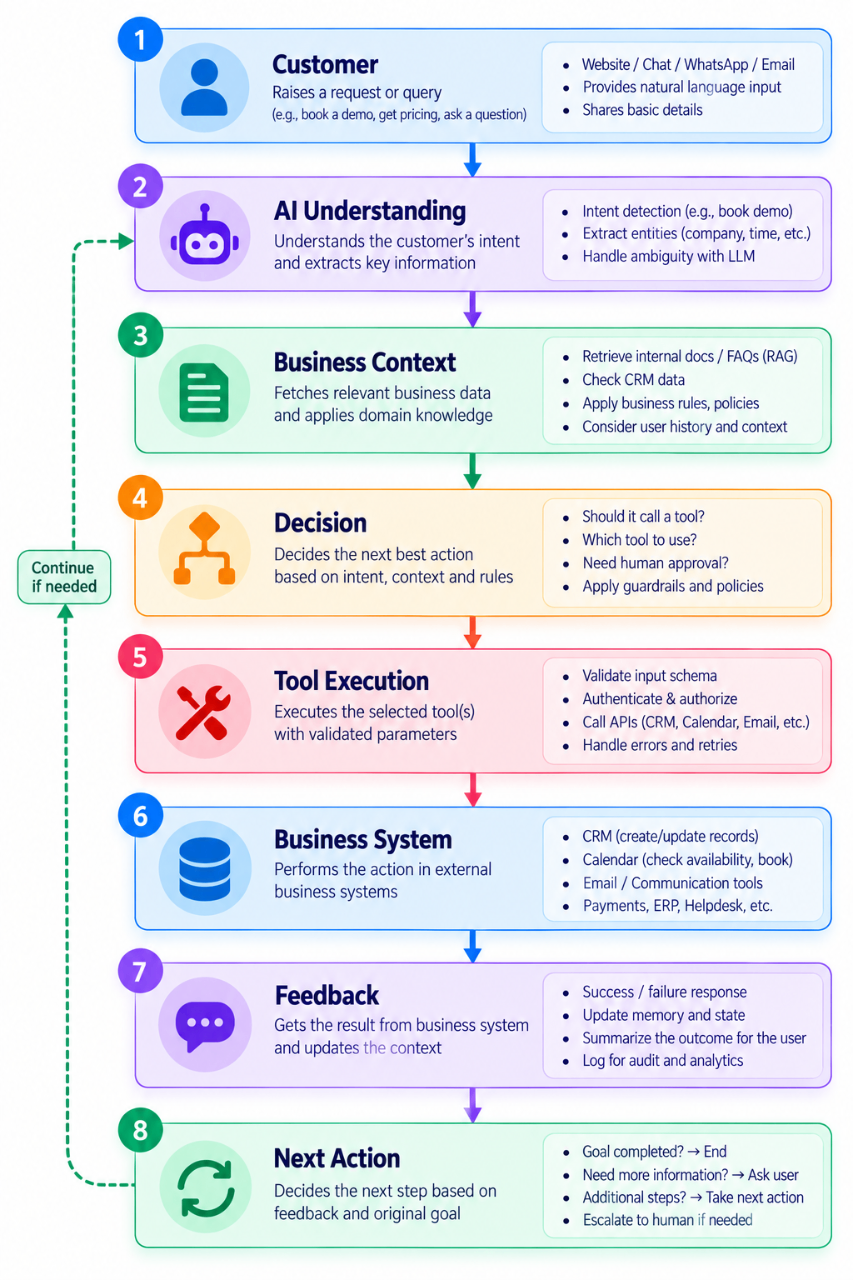
This creates an AI operating layer across business processes.
The architectural goal is not to replace every existing system. It is to create an intelligent orchestration layer that can work with the systems already in place.
How Samyora Fits Into the AI Workflow Stack
Samyora's role can be understood as a modular AI layer across different business interactions rather than simply another chatbot. For a practical example of a conversational channel feeding into customer and CRM workflows, see Transform Customer Communication with Intelligent WhatsApp CRM.
Its three core pillars can map naturally to different parts of an enterprise AI stack:
| Samyora Layer | Primary Role | Example Workflow |
|---|---|---|
| Visitor AI | Customer-facing intelligence | Website interaction → qualification → CRM |
| Operations AI | Internal workflow assistance | Business data → analysis → action |
| Personal AI | Individual productivity | Inbox/tasks → planning → execution |
This modular approach allows businesses to think about AI as a set of connected capabilities.
Visitor AI
Visitor-facing AI can handle conversations, understand intent, qualify leads, and initiate downstream workflows.
Visitor
  ↓
Visitor AI
  ↓
Qualification
  ↓
CRM / Sales Workflow
Operations AI
Operations AI can help teams turn business information into operational actions.
Business Data
  ↓
Operations AI
  ↓
Analysis / Decision Support
  ↓
Workflow / Team Action
Personal AI
Personal AI can sit closer to individual productivity workflows.
Inbox / Tasks / Calendar
          ↓
      Personal AI
          ↓
   Prioritize / Plan
          ↓
      Execute
The important engineering principle is that these layers should remain connected to controlled tools, business permissions, and observable workflows.
The objective is not to add AI everywhere.
It is to identify where intelligent reasoning can remove friction and connect that reasoning to reliable business execution.
Common Engineering Mistakes
1. Treating the LLM as the Application
The LLM should be one component inside a larger system.
2. Giving the Agent Direct Database Access
Prefer scoped tools and service-layer APIs.
Bad:
Agent → Production Database
Better:
Agent → Scoped Tool → Service Layer → Database
3. Allowing Unbounded Agent Loops
Always enforce:
- Maximum steps
- Maximum retries
- Maximum execution time
- Token budgets
4. Ignoring Duplicate Execution
Any externally visible side effect should have an idempotency strategy where retries are possible.
5. Storing Everything as Memory
Memory needs lifecycle policies, access controls, and relevance criteria.
6. Measuring Only Model Accuracy
A production workflow can have a high-quality model and still fail because of:
- Bad retrieval
- Tool errors
- Permission failures
- Slow APIs
- Poor state management
- Incorrect workflow transitions
7. Automating High-Risk Decisions Without Approval
Define clear human escalation boundaries before deployment.
The Future: From AI Assistants to AI Workflow Infrastructure
The evolution of enterprise AI can be summarized as:
Chatbots
   ↓
AI Assistants
   ↓
Tool-Using AI Agents
   ↓
Multi-Agent / Stateful Workflows
   ↓
Autonomous AI Workflow Infrastructure
The important shift is not simply from one model to a more capable model.
It is from response generation to controlled execution.
A mature system can:
Understand
   ↓
Retrieve
   ↓
Plan
   ↓
Act
   ↓
Observe
   ↓
Validate
   ↓
Update State
   ↓
Continue / Escalate
That loop is what allows AI to participate in real business operations.
But autonomy must remain bounded by engineering controls.
The strongest architecture is not the one that gives an AI agent unlimited authority.
It is the one that gives the agent exactly enough autonomy to complete its job safely and measurably.
Final Thoughts
The transition from AI chatbots to autonomous AI agents represents a shift in how businesses design software.
Chatbots primarily answer.
AI agents can reason, retrieve information, call tools, maintain state, and execute multi-step tasks.
An end-to-end AI workflow connects these capabilities to the systems where business actions actually happen.
For engineering teams, that means thinking beyond prompts.
It means designing:
- Tool schemas
- Agent runtimes
- Multi-tier memory
- RAG pipelines
- State machines
- DAGs
- Workflow orchestration
- API gateways
- Permission boundaries
- Idempotent operations
- Circuit breakers
- Observability
- Evaluation frameworks
- Human escalation
The practical path is straightforward:
Start with one workflow.
Separate probabilistic reasoning from deterministic execution.
Give agents scoped tools instead of unrestricted access.
Bound every autonomous loop.
Measure reliability, latency, groundedness, and cost.
Then scale the architecture to additional workflows.
The future of business AI is not simply a smarter chatbot.
It is an intelligent, observable, and controlled software layer that can move a business process from intent to execution.
The Commit Boundary: Where an AI Suggestion Becomes a Business Action
A useful distinction in agent architecture is the commit boundary: the point where a proposed tool call becomes a real change in an external system.
Before that boundary, an agent can interpret a request, retrieve information, and prepare an action. After it, a customer may receive an email, a CRM record may change, or a meeting may be booked. Those are different levels of responsibility.
Consider a lead-booking agent. Instead of letting it call create_calendar_event immediately, use a staged process:
- Propose: The agent produces a structured action containing the attendee, time, purpose, and source request.
- Authorize: The application checks the requesting user's permissions and the tool's allowed scope.
- Approve when required: A human reviews the exact proposed action, not a vague instruction such as “handle this lead.”
- Revalidate: Immediately before execution, the application checks that the slot is still free and the action still satisfies current policy.
- Commit: The calendar service performs the booking using a stable idempotency key.
- Reconcile: If the request times out, the system checks whether the booking already happened before attempting another action.
The approval should be tied to the specific action and its parameters. If the agent changes the attendee, time, or meeting purpose afterward, the previous approval should no longer authorize the new action.
This pattern also handles a subtle failure case: an unknown outcome is not the same as a failed action. A calendar API might create an event and then time out before returning its response. Blindly repeating the call can create a duplicate. The workflow should preserve the action ID, inspect the external system or retry through its idempotency mechanism, and record the final outcome.
The practical design rule is:
Let the agent propose. Let policy authorize. Let the business system commit. Then verify what actually happened.
That boundary makes autonomy easier to audit, retry, and trust.
Related Reading
-
AI Chatbots vs AI Agents: What's the Difference? (2026 Guide) — Understand the conceptual difference between conversational AI and agentic systems.
-
AI Agent Architecture Explained: How Modern AI Agents Actually Work — Explore planning, memory, reasoning, RAG, tools, and execution.
-
Building Safe AI Agents: Best Practices for Production Deployment — Learn how to design security, guardrails, evaluation, and human-approval controls.
-
How AI Automation Can Save Businesses 20+ Hours Every Week in 2026 — Explore practical business automation use cases.
-
Is Your Website Losing Customers? Here's How AI Can Help — See how AI agents can support website navigation, lead generation, customer support, and appointment booking.
-
Transform Customer Communication with Intelligent WhatsApp CRM — Explore how conversational AI can connect with CRM and customer-communication workflows.
-
10 AI Tools Every Small Business Needs in 2026 — Understand why disconnected AI tools are less useful than a unified workflow.
Related Posts
Engineering•10 min read
Bank of Baroda Data Breach 2026: How One Compromised Employee Email Created a Massive Security Risk
The 2026 Bank of Baroda data breach shows why securing core banking systems is not enough. Learn what happened, what data was reportedly exposed, how email compromise enabled the incident, and the security controls enterprises should implement.
Engineering•12 min read
What Is a GTM Engineer? Skills, Responsibilities & How AI Is Transforming Modern Go-to-Market Teams
Learn how GTM Engineers use AI, automation, and CRM integrations to streamline go-to-market strategies, improve sales efficiency, and drive business growth.
Engineering•8 min read
AI Agent Architecture Explained: How Modern AI Agents Actually Work
Learn how modern AI agent architecture works, including planning, memory, reasoning, knowledge retrieval, tool use, and execution. Discover how AI agents power intelligent business automation.